How to prepare for NEET CBT: a simple 4-week plan
Keep your NEET study plan and add short screen practice. Practise reading, moving between questions and using a mouse, while you keep solving questions on paper. NTA has not announced NEET 2027's mode as of 4 November 2026, according to its site. Treat CBT practice as extra preparation.
What should I practise for a CBT?
Practise answering questions while looking at a screen, then use a rough sheet for working. Your hand can solve the sums on paper while your eyes return to the question on screen. This takes a little practice, especially if you usually read from a book.
Use a mouse for each action. Point, click once, and check that the answer or question changed. Avoid quick repeated clicks. If the page feels slow, pause for a moment and look at the screen before clicking again.
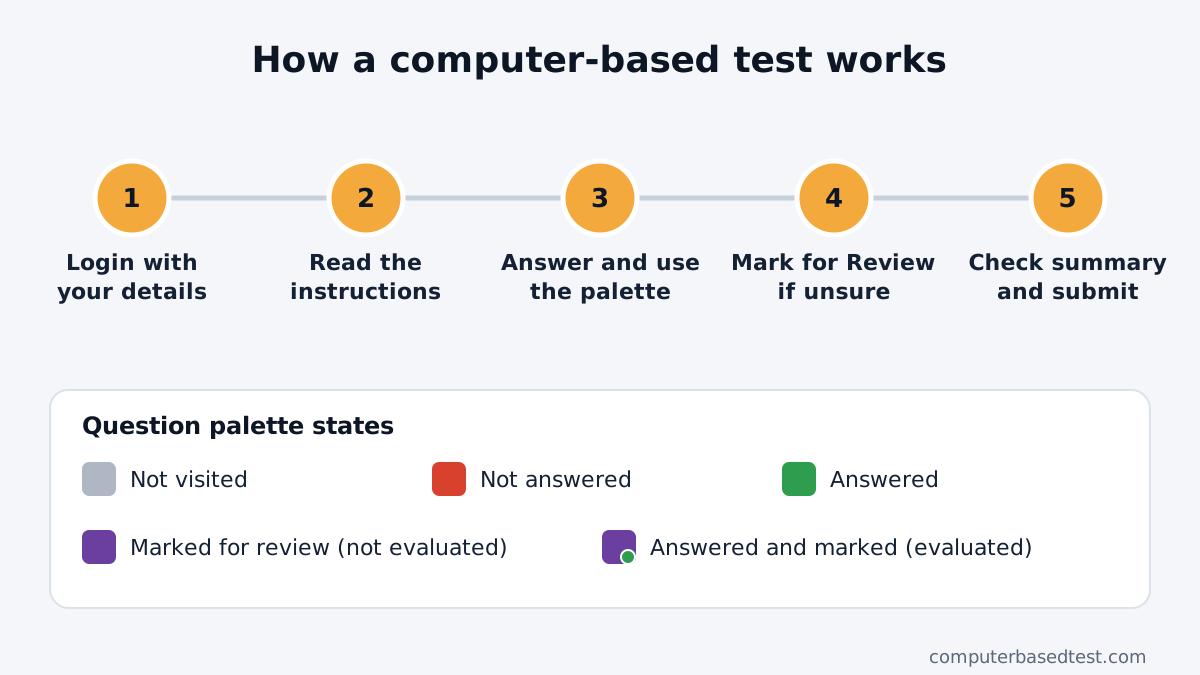
Learn the question palette. It lets you move to another question, but NTA's JEE Main instructions say selecting a number does not save your current answer. Use the right save button before moving on. Read what each CBT button and palette state means and try them on our practice screen.
Keep your rough work beside the screen, not over the question text. Write only the steps you need, then look back up. In NTA's JEE Main and CUET instructions, rough sheets are provided at the centre and returned to the invigilator. NEET's own CBT rules have not been announced.
How should I practise screen reading and time checks?
Build up to reading on a screen for three hours, the current NEET duration according to the 2025 pattern notice. NTA has not announced the 2027 pattern, so use this as a practice target. Start with a short set, then make the next practice longer. Keep the text at a comfortable size and sit far enough back to see the full question without leaning in.
In a full paper, check your pace after every 45 questions. That gives you a simple checkpoint for Physics, Chemistry and Biology. If you are behind, move on from a question that is taking too long and return to it later.
Try reading the whole question before clicking an answer. Watch for words such as “not” or “incorrect”. On a screen, it is easy to scroll past a line or click an option before you have finished reading.
What is a simple 4-week CBT practice plan?
Use this plan alongside your normal subject study. If you have less time, keep the order and shorten each practice session.
| Week | What to do | Target |
|---|---|---|
| 1 | Practise short question sets on a screen. Use the mouse and palette slowly. Solve workings on paper. | Get used to reading and clicking without rushing. |
| 2 | Take timed subject sets. Practise saving an answer, changing it and marking a question to revisit. | Make each screen action deliberate. |
| 3 | Take one longer mixed set. Check your pace after each 45 questions. Review every question you guessed or left. | Spot where time goes and why errors happen. |
| 4 | Take full-length CBT practice papers in a quiet place. Review the paper after each attempt. | Follow a steady routine from the first question to the last. |
The targets are practice goals, not NTA rules. Change the pace to fit your study schedule. Keep revising your subjects throughout all four weeks.
How do I use a full mock and review it well?
Take a mock in one sitting when you can. Keep your phone away, use a desk, and avoid pausing to check messages. Practise with the same screen setup each time so you can focus on your questions.
After the mock, sort mistakes into a few clear groups: a subject gap, a misread question, a rushed click, or a time problem. Write down one fix for each group. For example, if you misread a question, slow down at the key instruction word next time.
Review questions you marked to return to, even if you got them right. Ask whether you knew the answer or guessed. A correct guess still shows you what to revise.
Our free full-paper CBT practice gives you a result after the test. Use it to practise the screen and review your attempt. It is our practice tool, not an official NTA NEET CBT mock. NTA has not released a NEET-specific official CBT mock. You can also read how CBT differs from OMR and what NTA has announced about NEET 2027.
Should I practise on a laptop or phone?
Use a laptop or desktop for longer practice if you can. A larger screen gives you more room to see the question and palette together. Practise mouse control there, since the exam interface is made for a computer terminal.
A phone can help you review a few questions when you are away from your desk. It is not a replacement for longer screen practice. A small screen may mean more scrolling, so practise full papers on a larger screen when possible.
How can I avoid eye strain and poor posture?
Sit upright with your back supported and both feet resting comfortably. Keep the screen at a comfortable distance and avoid leaning close to read. Take a short break between practice sessions, and look away from the screen before starting the next one.
Keep water nearby. Stop if your eyes feel tired, then return when you can read comfortably. Your practice should help you build a steady routine, not leave you exhausted.
What mistakes do students make in their first CBT practice?
- Clicking a palette number before saving the answer on the current question.
- Spending too long on one question instead of moving on and returning later.
- Scrolling too fast and missing a line, a diagram or a negative word.
- Clicking twice because the first click did not seem to work.
- Forgetting to check the palette after answering or changing a response.
- Doing rough work in a way that hides the question on screen.
In NTA's JEE Main and CUET instructions, an answer marked for review is evaluated if you selected an answer too. A question marked for review without an answer is not evaluated. NEET's CBT rules are not out, so use the NTA-style screen guide to learn the current interface, then check NEET instructions if NTA publishes them.
Questions students ask
How can I practise for NEET CBT at home?
Use a computer-based mock, answer with a mouse, and do calculations on paper beside you. Review your clicks and timing after each set. Keep your usual subject study going too.
Should I stop solving questions on paper?
No. Keep using paper for rough work and subject practice. Screen practice adds comfort with reading and moving through questions.
How many full CBT mocks should I take each week?
There is no fixed number in the NTA material. Start with a schedule you can review properly, then add more only if it fits your study and rest time.
Is NEET 2027 confirmed as CBT?
No official notice had announced the mode as of 4 November 2026. NTA has not announced this yet. Read the latest NEET CBT status for the dated update.
Can I take the practice test on my phone?
You can use a phone for short practice. Use a laptop or desktop for full papers when possible, so you can practise with a larger screen and mouse.